
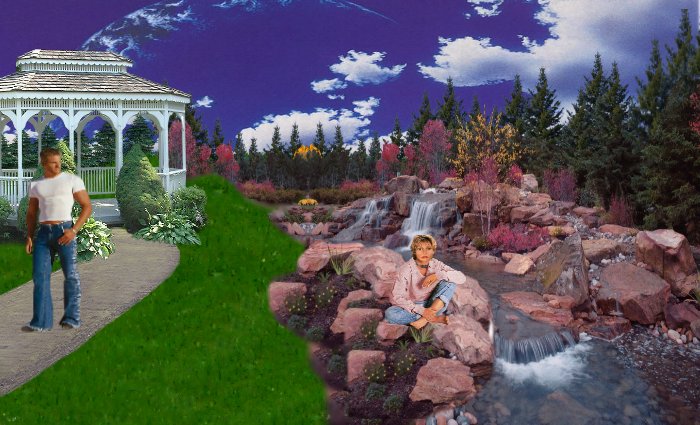
Here is the Image we are going to Create.
The trees and waterfall are where I work. Pretty
huh?
Zip1
Zip2
Zip3
Zip4
Zip5
Zip6
Open a new image 700 x 425, transparent.
Open the sample’s from the images supplied and minimize. The WBE, Sky and Grass
I had to reduce them in size , so you will have to enlarge them again...go to Image
resize, resize them to 200% and they should be back to perfect size.
Add new Raster Layer…..
1. Sky:
Open sky image…Edit, Copy, (close your sky image)
Paste as new layer. Name and save your work.
2. Grass:
Open grass image…. Edit, Copy, (close your grass image)
Paste as new layer. Move to bottom, layers, duplicate, move grass layer up half way.
3. Trees:
Open Trees image….Edit, Copy, (close your trees image)
Paste as new layer. Move to left side, above grass layer. Save your work
.
Save.
4. Pathway:
Open Pathway image….Edit, Copy, (close your pathway image)
Paste as new layer. Move to left side, you will see where it has to be, once you put the
gazebo on..Name and save your work.
5. WBE:
Open WBE image….Edit, Copy, (close your WBE image)
Paste as new layer. Move to Right side, from bottom of image up.
Save your work.
6. Gazebo:
Open Gazebo image….Edit, Copy, (close your Gazebo image)
Paste as new layer. Move to left side, just below the trees, on top of the pathway
(you may have to move the pathway under it just a bit).
Save your work.
7. Guy:
Open Guy image….Edit, Copy, (close your Guy image)
Paste as new layer. Move on top of the pathway.
Save your work.
8. Girl:
Open Girl image….Edit, Copy, (close your Girl image)
Paste as new layer. Move on top of the rocks.
Save your work. And you are done. Hope you have enjoyed!
Any questions feel free to e-mail me!

  
Page last updated on
05/04/2004 10:19:40 PM

(c) Outlaw by Design 2003
|