

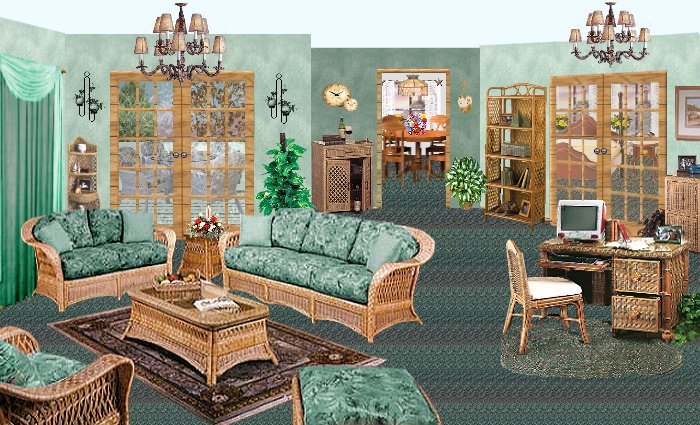
We will be doing a tut on layers for this room .
Here
is the finished results of room 30
If
you have not done the tut for room 30
Go to
Jaddells site
and do the tut! Here
are the zip files of furniture for you. Zip
file 1 Here
Zip
file 2 Here
Zip
file 3 Here
Zip
file 4 Here
Zip
file 5 Here
Ok
now that you have all your files lets start!
Open
up your room 30 that you did.
I did the tut of room 30. I renamed each layer as I went. So that I could show you
how to add the layers, the easiest way. I also took all my tubes and added them in a
folder so I could use them.  (I have already resized everything for you... We will be
starting at the bottom of the layer palette...and I shut all other layers off so I can see
what I am doing...like adding the sky.  Then I turn on patio layer to make sure its
right...then I turn patio layer back off.
I have enclosed two jpgs of my layer palette so you could go along and check yours.
So lets get started!
Click on your bottom layer (make sure its your rug layer)
1. Open sky.jpg.  (you can see I cut out the windows already, I wanted to use different
windows)   Ok, open sky.jpg ..... copy/paste as new layer on your room, move to desired
position.
2. Open tree1... copy/paste as new layer on your room, move to desired position.
3. Open tree2 ....copy/paste as new layer on your room, move to desired position.
I highlighted wall windows on my layer palette next.
4. Open new window.....copy/paste as new layer on your room, move to desired position
over one of back windows.
5.  On the layer palette right click on the new window, duplicate layer. Move to other
window.
Now highlight patio floor.
6. Open backkitchenwindow...copy/paste as new layer on your room, move to desired
position over kitchen window.
7.  Open kitchen table... copy/paste as new layer on your room, move to desired position
in kitchen.
8.  Open flowers on table. ....copy/paste as new layer on your room, move to desired
position.
9.  Open kitchen light....copy/paste as new layer on your room, move to desired position
above table.
Now highlight patio railing.
10.  Open patio set.....copy/paste as new layer on your room, move to desired position
on patio.
Now highlight wall 2.
11.  Open bedroomset....copy/paste as new layer on your room, move to desired position
in room.
Now highlight wall 5.
12.  Open glasspatiodoor....copy/paste as new layer on your room, move to desired position
over patio doorway. (I didn't use the glass in the tut, if you have, you can skip this and #13.
On layer palette turn opacity down to 37.
13. Open glassbedroomdoor....copy/paste as new layer on your room, move to desired position
over bedroom doorway. Lower opacity to 25.
Now highlight the doorknobs. I deleted kitchen door here, and erased that door knob.
14. Open floor molding...copy/paste as new layer on your room, move to desired position.
15. Open cornerwicker shelf.....copy/paste as new layer on your room, move to desired
position in corner.
16.  Now open wickerbookshelf....copy/paste as new layer on your room, move to desired
position along wall by bedroom doorway.
17. Now open filecabphone......copy/paste as new layer on your room, move to desired
position in right bottom corner.
18. Open deskset...copy/paste as new layer on your room, move to desired positions...
I have mine about 250 mark on side ruler.
19.  Open wickerbarcart...copy/paste as new layer on your room, move to desired position
by kitchen doorway in corner.
20.  Open drapes...copy/paste as new layer on your room, move to desired position over
left window.
21.  Open plantbydoors....copy/paste as new layer on your room, move to desired position
move to right side of patio doors.
22. Open livingroomfurn......copy/paste as new layer on your room, move to desired position
on the left corner of the room.
23. Open wallclock..........copy/paste as new layer on your room, move to desired position
above the bar cart.
24.  Open wallplanters. ....copy/paste as new layer on your room, move to desired position
next to patio door.
25. Duplicate wallplanters layer, move to other side of the door.
26.  Open wecomesign.....copy/paste as new layer on your room, move to desired position
move by the bookshelf.
27.  Open wallpicture......copy/paste as new layer on your room, move to desired position
above filecabphone.
28.  Open flowers on table........copy/paste as new layer on your room, move to desired
position above table between couches.
29.  Open smallplantbykitchen.....copy/paste as new layer on your room, move to desired
position by kitchen doorway.
30.  Open ceilinglight....copy/paste as new layer on your room, move to desired position
above living room.
31.   Layer palette, duplicate the ceiling light, move to above desk...use deformation tool
to make it a bit smaller.
Thats it...hope this has helped you... And you enjoyed making your room!

any questions please feel free to yell.
Resqur@wowway.com
or on Yahoo messenger... Roomsgalore1

  
Page last updated on
01/05/2004 07:42:47 PM

(c) Outlaw by Design 2003
|